
 Kia K900: Manual heating and air conditioning
The heating and cooling system can be controlled manually by pushing buttons other than the AUTO button.
In this case, the system works sequentially according to the order of buttons selected. When pressing any button except the AUTO button while using automatic operation, the functions not selected will be controlled automatically.
1.Start the engine.
2.Set the mode to the desired position.
For improving the effectiveness of heating and cooling;
- Heating: 
- Cooling: 
3.Set the temperature control to the desired position.
4.Set the air intake control to the outside (fresh) air position.
5.Set the fan speed control to the desired speed.
6.If air conditioning is desired, turn the air conditioning system on.
Press the AUTO button in order to convert to full automatic control of the system.
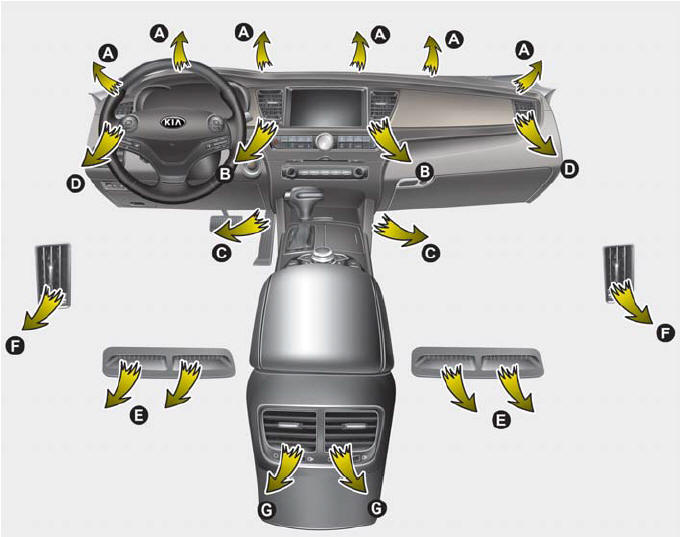
Rear outlet vents (F)
- The air flow of the Rear outlet vents is controlled by the front climate control system and delivered through the inside air duct of the front doors. If the door is open or not closed completely, the air flow of the Rear outlet vent is not delivered properly. Make sure the front doors are closed completely.
- The air flow of the Rear outlet vents may be weaker than the instrument panel vents for the long air duct in the front doors.
- Mode selection
- Temperature control
- Air intake control
- Fan speed control
- Air conditioning
- OFF mode
- Climate information screen selection
- Rear control lock
 Automatic heating and air conditioning
1.Press the AUTO button.
The modes, fan speeds, air intake and air-conditioning will be controlled automatically
according to the temperature setting.
2.Press the TEMP button to set the desire ...
 Mode selection
The mode selection button controls the direction of the air flow through the
ventilation system.
The air flow outlet port is converted as follows:
Face-Level (B, C, D, E, F, G)
Air flow is ...
See also:
Fan speed control
The fan speed can be set to the desired speed by pressing the fan speed control
button(for front) or turning the fan speed control knob (for rear).
To change the fan speed, press the (
) part of ...
Detecting sensor
The sensors are located inside of the rear bumper.
Always keep the rear bumper clean for the system to work properly. ...
Tire Pressure
This mode displays the pressure status of each tire.
You can change the tire pressure unit in "User settings" mode. ...
Categories
