
 Kia K900: Climate information screen selection
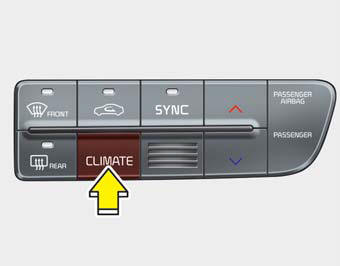
Press the climate information screen selection button to display climate information on the screen.
 OFF mode
Press the front OFF button to turn off the air climate control system. However,
you can still operate the mode and air intake buttons as long as the Engine
Start/Stop Button is in the ON po ...
 Rear control lock
You can activate or deactivate the rear seat control, rear audio control and
climate control by using the REAR LOCK button on the rear armrest or “System Settings”
in the AVN (Audio, Video, ...
See also:
Power Trunk
(1) Power Trunk Main Control button (or lever)
(2) Power Trunk Open button
(3) Power Trunk Close button
(4) Power Trunk Lock button
To open:
1. Make sure the shift lever is in P (Park).
2. T ...
Blade replacement
When the wipers no longer clean adequately, the blades may be worn or cracked,
and require replacement.
CAUTION
To prevent damage to the wiper arms or other components, do not attempt to
move th ...
30,000 miles (48,000 km) or 24 months
Rotate tires
Inspect vacuum hose
Inspect air conditioning refrigerant
Inspect brake hoses and lines
Inspect drive shafts and boots
Inspect exhaust pipe and muffler
Inspect front brake d ...
Categories
