
 Kia K900: ACC(Accessory)
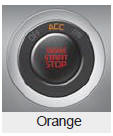
Press the ENGINE START/STOP button while it is in the OFF position without depressing the brake pedal.
The steering wheel unlocks and electrical accessories are operational.
If the ENGINE START/STOP button is in the ACC position for more than 1 hour, the button is turned off automatically to prevent battery discharge.
 Off
Off
To turn off the engine (START/STOP position) or vehicle power (ON position),
press the ENGINE START/STOP button with the shift lever in the P (Park) position.
When you press the ENGINE START/STO ...
 ON
ON
Press the ENGINE START/STOP button while it is in the ACC position without depressing
the brake pedal.
The warning lights can be checked before the engine is started. Do not leave
the ENGINE ST ...
See also:
Exterior overview
Front view
1. Hood
2. Head lamp
3. Fog lamp
4. Tire and wheel
5. Outside rearview mirror
6. Panoramic Sunroof
7. Front windshield wiper blades
8. Windows
Rear view
9. Door
10. Fuel fill ...
Battery recharging by battery charger
Your vehicle has a maintenance-free, calcium-based battery.
If the battery becomes discharged in a short time (because, for example,
the headlights or interior lights were left on while the veh ...
Pre-Safe Seat belt (PSB)
The pre-safe seat belt will activate and pull the seat belt into tighter contact
against the occupant's body if a collision is detected or during certain driving
maneuvers.
CAUTION
The pre ...
Categories
