
 Kia K900: Front fog light
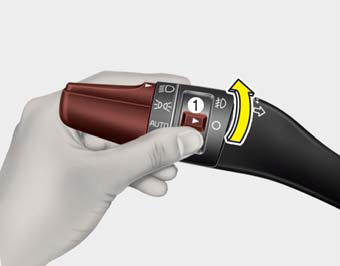
Fog lights are used to provide improved visibility when visibility is poor due to fog, rain or snow, etc.
1. Turn on the head light.
2. Turn the light switch (1) to the front fog light position.
3. To turn off the front fog light, turn the light switch to the front fog light position again or turn off the head light.
CAUTION
When in operation, the fog lights consume large amounts of vehicle electrical power. Only use the fog lights when visibility is poor or unnecessary battery and generator drain could occur.
 Turn signals and lane change signals
The Engine Start/Stop Button must be ON position for the turn signals to function.
To turn on the turn signals, move the lever up or down (A). The green arrow indicators
on the instrument panel ...
 Headlight leveling device
Automatic type
It is automatically adjusted the headlight beam level according to the number
of the passengers and the loading weight in the luggage area.
And it offers the proper headlight beam u ...
See also:
LCD Display Control
The LCD display modes can be changed by using the control buttons on the steering
wheel.
(1) < , > : MODE button for changing modes.
(2) ,
: MOVE button for changing items
(3) OK : SEL ...
Washer fluid
Checking the washer fluid level
The reservoir is translucent so that you can check the level with a quick visual
inspection.
Check the fluid level in the washer fluid reservoir and add fluid if ...
Drive mode integrated control system
Drive mode / Snow mode
The drive mode may be selected according to the driver’s preference or road condition.
The system initializes to the normal mode after the engine start/stop button
has ...
Categories
