
 Kia K900: USB charger
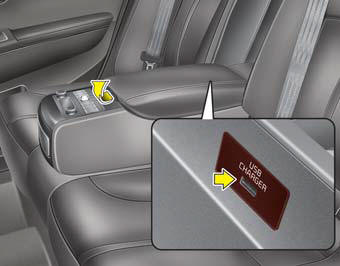
The USB charger is designed to recharge batteries of small size electrical devices using a USB cable. The electrical devices can be recharged when the Engine Start/Stop button is in ACC/ON/START position.
The battery charging state may be monitored on the electrical device. Disconnect the USB cable from the USB port after use.
- Some devices are not supported for fast charging but will be charged with normal speed.
- Use the USB charger when the engine is running to prevent battery discharge.
- Only devices that fits the USB port can be used.
- The USB charger can be used only for battery charging purposes.
- Battery chargers cannot be charged.
 Aux, USB and iPod® port
If your vehicle has an aux and/or USB(universal serial bus) port or iPod® port,
you can use an aux port to connect audio devices and a USB port to plug in a USB,
and an iPod® port to plug in a ...
 Audio / Video / Navigation system (AVN)
Detailed information for the AVN system is described in a separately supplied
manual. ...
See also:
Instrument panel fuse panel
Inside the fuse/relay panel covers, you can find the fuse/relay label describing
fuse/relay name and capacity.
✽ NOTICE
Not all fuse panel descriptions in this manual may be applicable to ...
Surround view monitoring system (SVM)
The Surround View Monitoring System (SVM) is not a substitute for proper and
safe parking procedures.
The Surround View Monitoring System (SVM) may not detect every object surrounding
the vehic ...
Cruise SET Indicator Light
This indicator light illuminates:
When the cruise control speed is set. ...
Categories
