
 Kia K900: Aux, USB and iPod® port
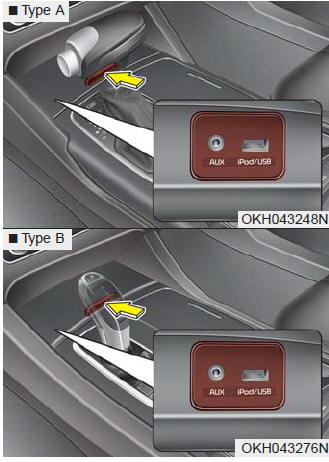
If your vehicle has an aux and/or USB(universal serial bus) port or iPod® port, you can use an aux port to connect audio devices and a USB port to plug in a USB, and an iPod® port to plug in an iPod®.
✽ NOTICE
When using a portable audio device connected to the power outlet, noise may occur during playback. If this happens, use the power source of the portable audio device.

 USB charger
The USB charger is designed to recharge batteries of small size electrical devices
using a USB cable. The electrical devices can be recharged when the Engine Start/Stop
button is in ACC/ON/START ...
See also:
If engine stalls while driving
1.Reduce your speed gradually, keeping a straight line. Move cautiously off the
road to a safe place.
2.Turn on your emergency flashers.
3.Try to start the engine again. If your vehicle will not s ...
Gasoline containing alcohol and methanol
Gasohol, a mixture of gasoline and ethanol (also known as grain alcohol), and
gasoline or gasohol containing methanol (also known as wood alcohol) are being marketed
along with or instead of leade ...
Auto hold
The Auto Hold maintains the vehicle in a standstill even though the brake pedal
is not depressed after the driver brings the vehicle to a complete stop by depressing
the brake pedal.
Set up
1. ...
Categories
