
 Kia K900: Sensor to detect distance to the vehicle ahead
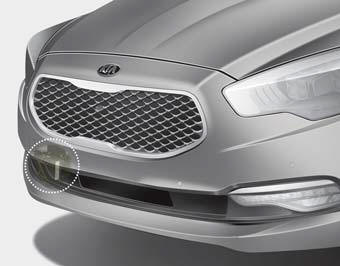
The sensor detects distance to the vehicle ahead.
If the sensor is covered with dirt or other foreign matter, the vehicle to vehicle distance control may not operate correctly.
Always keep the sensor clean.
Sensor malfunction indicator

If the sensor or cover is dirty or obscured with foreign matter such as snow, the indicator will illuminate.
Clean the sensor by using a soft cloth.
ASCC malfunction indicator

The warning light illuminates when the vehicle to vehicle distance control system is not functioning normally.
Take your vehicle to an authorized K900 Kia dealer and have the system checked.
CAUTION
- Do not install accessories around the sensor and do not replace the bumper by yourself. It may interfere with the sensor performance.
- Always keep the sensor and bumper clean.
- To prevent sensor cover damage from occurring, wash the car with a soft cloth.
- Do not damage the sensor or sensor area by a strong impact. If the sensor moves slightly off position, the ASCC will not operate correctly. If this occurs, have your vehicle checked by an authorized K900 Kia dealer as soon as possible.
- Use only a genuine Kia sensor cover for your vehicle.
 In traffic situation
In traffic, your vehicle will stop if the vehicle ahead of you stops. Also, if
the vehicle ahead of you starts moving, your vehicle will start as well.
However, if the vehicle stops for more than ...
 To convert to cruise control mode
The driver may choose to only use the cruise control mode (speed control function)
by doing as follows:
1.Turn the ASCC on (the cruise indicator light will be on but the system will
not be acti ...
See also:
Vehicle certification label
The vehicle certification label attached on the driver’s side center pillar gives
the vehicle identification number (VIN). ...
Securing a child restraint seat with tether anchorage system
Child restraint hook holders are located on the package tray.
This symbol indicates the position of the tether anchor.
1.Route the child restraint seat strap over the seatback.
For vehicles w ...
Advanced Smart Cruise Control (ASCC) Radar Warning Light
This warning light illuminates:
When the radar of the advanced smart cruise control system or its cover is stained.
Remove the stains with a soft cloth ...
Categories
