
 Kia K900: Record your key number
The key code number is stamped on the key code tag attached to the key set. Should you lose your keys, this number will enable an authorized K900 Kia dealer to duplicate the keys easily.
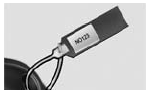
Remove the key code tag and store it in a safe place. Also, record the key code number and keep it in a safe and handy place, but not in the vehicle.
WARNING
Smart key
Leaving children unattended in a vehicle with the smart key is dangerous. Children copy adults and they could press the ENGINE START/STOP button. It would enable children to operate power windows or other controls, or even make the vehicle move, which could result in serious bodily injury or even death. Never leave the keys in your vehicle with unsupervised children when the engine is running.
 Smart key
...
 Smart key functions
1. Door lock
2. Door unlock
3. Trunk open
4. Panic alarm
With smart key, you can lock or unlock doors (and trunk) and start the engine
without inserting the key. Refer to the following ...
See also:
Transmission ranges
The indicator in the instrument cluster displays the shift lever position when
the Engine Start/Stop Button is in the ON position.
P (Park)
Always come to a complete stop before shifting into P (P ...
Wheel alignment and tire balance
The wheels on your vehicle were aligned and balanced carefully at the factory
to give you the longest tire life and best overall performance.
In most cases, you will not need to have your wheels al ...
Blade replacement
When the wipers no longer clean adequately, the blades may be worn or cracked,
and require replacement.
CAUTION
To prevent damage to the wiper arms or other components, do not attempt to
move th ...
Categories
