
 Kia K900: Lumbar support (for driver’s seat)
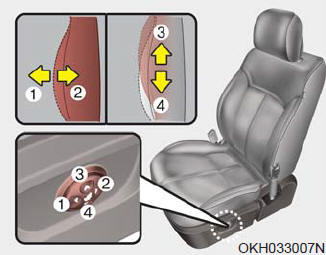
The lumbar support can be adjusted by pressing the lumbar support switch on the side of the drivers seat. Press the front portion of the switch (1) to increase support, or the rear portion of the switch (2), to decrease support.
Move the support position up and down by pressing the switch (3) or (4). Release the switch once the seat reaches the desired position.
 Seat cushion height
Pull the front portion of the control switch up to raise or down to lower the
front part of the seat cushion. Pull the rear portion of the control switch up to
raise or down to lower the rear pa ...
 Cushion length adjustment (for driver’s seat)
Push the control switch forward or backward to move the seat cushion to the desired
length. Release the switch once the seat cushion reaches the desired length. ...
See also:
On curves
On curves, the ASCC may not detect a moving vehicle in your lane, and then
your vehicle could accelerate to the set speed. Also, the vehicle speed will
rapidly slow down when the vehicle ahea ...
Interior overview
1. Inside door handle
2. Front power seat adjust switch
3. Outside rearview mirror folding
4. Outside rearview mirror control
5. Power window lock switch
6. Central door lock switch
7. Power ...
Highway driving
Tires
Adjust the tire inflation pressures to specification. Low tire inflation pressures
will result in overheating and possible failure of the tires.
Avoid using worn or damaged tires which may r ...
Categories
