
 Kia K900: Front fog light
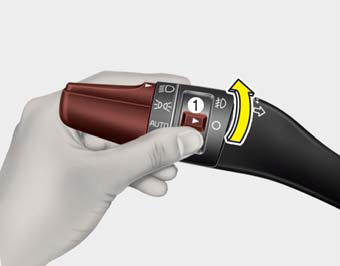
Fog lights are used to provide improved visibility when visibility is poor due to fog, rain or snow, etc.
1. Turn on the head light.
2. Turn the light switch (1) to the front fog light position.
3. To turn off the front fog light, turn the light switch to the front fog light position again or turn off the head light.
CAUTION
When in operation, the fog lights consume large amounts of vehicle electrical power. Only use the fog lights when visibility is poor or unnecessary battery and generator drain could occur.
 Turn signals and lane change signals
The Engine Start/Stop Button must be ON position for the turn signals to function.
To turn on the turn signals, move the lever up or down (A). The green arrow indicators
on the instrument panel ...
 Headlight leveling device
Automatic type
It is automatically adjusted the headlight beam level according to the number
of the passengers and the loading weight in the luggage area.
And it offers the proper headlight beam u ...
See also:
Electronic Stability Control (ESC) Indicator Light
This indicator light illuminates:
Once you set the ignition switch or Engine Start/Stop Button to the ON position.
It illuminates for approximately 3 seconds and then goes off.
When there i ...
Before entering vehicle
Be sure that all windows, outside mirror(s), and outside lights are clean.
Check the condition of the tires.
Check under the vehicle for any sign of leaks.
Be sure there are no obstacles behi ...
Cushion length adjustment (for driver’s seat)
Push the control switch forward or backward to move the seat cushion to the desired
length. Release the switch once the seat cushion reaches the desired length. ...
Categories
