
 Kia K900: Battery replacement
Conventional smart key
A battery should last for several years, but if the smart key is not working properly, try replacing the battery with a new one. If you are unsure how to use or replace the battery, contact an authorized K900 Kia dealer.
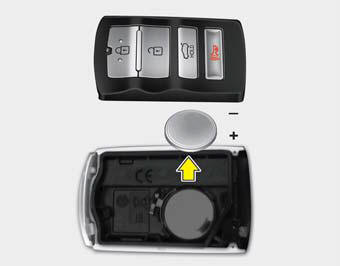
1.Pry open the smart key center cover.
2.Replace the battery with a new battery (CR2032). When replacing the battery, make sure the battery position.
3.Install the battery in the reverse order of removal.
Card type smart key
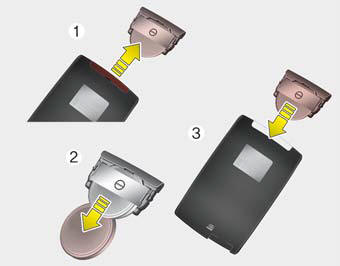
1.Pull out the battery and battery cover.
2.Remove the old battery and insert the new battery (CR2412). Make sure the battery position is correct.
3.Reinstall the battery cover and battery.
The smart key is designed to give you years of trouble-free use, however it can malfunction if exposed to moisture or static electricity. If you are unsure how to use or replace the battery, contact an authorized K900 Kia dealer.
Using the wrong battery can cause the transmitter or smart key to malfunction. Be sure to use the correct battery.
An inappropriately disposed battery can be harmful to the environment and human health.
Dispose the battery according to your local law(s) or regulation.
CAUTION
Transmitter damage
Do not drop, wet or expose the keyless entry system transmitter to heat or sunlight.
 Pursuant to Code of Federal Regulations, Title 47, Part 15 ("FCC Rules")
Operation is subject to the following two conditions:
1.This device may not cause harmful interference, and
2.This device must accept any interference received, including interference that
may cau ...
 Mechanical key operations
Used to lock and unlock the glove box.
Lock and unlock the doors when the vehicle or smart key battery is discharged.
Conventional smart key
To remove the mechanical key, press and hold the ...
See also:
Seat cushion height
Pull the front portion of the control switch up to raise or down to lower the
front part of the seat cushion. Pull the rear portion of the control switch up to
raise or down to lower the rear pa ...
Driver Information System (DIS)
Detailed information for the DIS system is described in a separately supplied
manual. ...
Service Interval
Service required
It calculates and displays when you need a scheduled maintenance service (mileage
or days).
If the remaining mileage or time reaches 900 miles (1,500 km) or 30 days, "Servi ...
Categories
