
 Kia K900: Advanced vehicle safety management (AVSM)
The AVSM assists the driver by providing notification is the system detects on object ahead that is too close to the vehicle and which may require the dirver to apply the brake pedal or reduce vehicle speed. If the AVSM detects such an object, the system will issue a caution message, provide a warning sound, and the seat belt vibrate.
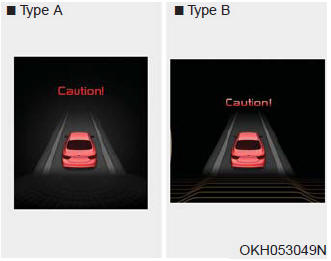
- If the AVSM senses the object ahead is too close to the vehicle that the driver needs to operate the brake pedal, the warning light above will illuminate. Immediately reduce your speed.
- If the AVSM senses objects, the warning sound also operates and the seat belt vibrates.
Immediately reduce your speed.
This system is only a supplemental system and it is not intended to, nor does it replace the need for extreme care and attention of the driver. The sensing range and objects detectable by the sensors are limited.
Pay attention to the road conditions at all times.
 Good braking practices
Check to be sure the parking brake is not engaged and that the parking brake
indicator light is out before driving away.
Driving through water may get the brakes wet. They can also get wet whe ...
 Brake operation
If the driver releases the accelerator after the warning, the AVSM automatically
brakes the vehicle gently.
If the driver hits the brake to reduce vehicle speed, the brake assistant
system ...
See also:
Tire maintenance
In addition to proper inflation, correct wheel alignment helps to decrease tire
wear. If you find a tire is worn unevenly, have your dealer check the wheel alignment.
When you have new tires instal ...
Lumbar support (for rear right and left passenger’s seat)
For right side :
Press the R switch.
The lumbar support can be adjusted by pushing the lumbar support lever.
Push the lever to left side (1) increase support or push the lever to the right
...
Vehicle weight
This section will guide you in the proper loading of your vehicle and/or trailer,
to keep your loaded vehicle weight within its design rating capability, with or
without a trailer.
Properly loadi ...
Categories
