
 Kia K900: To convert to cruise control mode
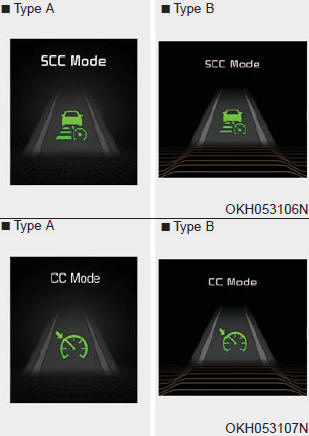
The driver may choose to only use the cruise control mode (speed control function) by doing as follows:
1.Turn the ASCC on (the cruise indicator light will be on but the system will not be activated).
2.Push the distance to distance switch for more than 2 seconds.
3.Choose between "Smart cruise control(SCC) mode" and "Cruise control(CC) mode".
WARNING
When using the cruise control mode, you must manually assess the distance to other vehicles as the system will not automatically brake to slow down for other vehicles.
 Sensor to detect distance to the vehicle ahead
The sensor detects distance to the vehicle ahead.
If the sensor is covered with dirt or other foreign matter, the vehicle to vehicle
distance control may not operate correctly.
Always keep the s ...
 Limitations of the system
The ASCC may have limits to its ability to detect distance to the vehicle ahead
due to road and traffic conditions. ...
See also:
Anti-lock Brake System (ABS) Warning Light
This warning light illuminates:
Once you set the ignition switch or Engine Start/Stop Button to the ON position.
It illuminates for approximately 3 seconds and then goes off.
When there is ...
Securing a child restraint seat with tether anchorage system
Child restraint hook holders are located on the package tray.
This symbol indicates the position of the tether anchor.
1.Route the child restraint seat strap over the seatback.
For vehicles w ...
45,000 miles (72,000 km) or 36 months
Rotate tires
Inspect air cleaner filter
Inspect vacuum hose
Inspect air conditioning refrigerant
Inspect brake hoses and lines
Inspect drive shafts and boots
Inspect exhaust pipe and mu ...
Categories
