
 Kia K900: Automatic heating and air conditioning
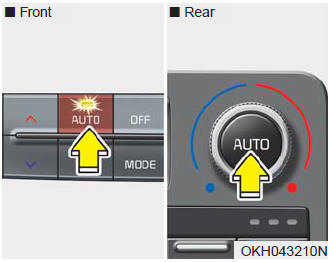
1.Press the AUTO button.
The modes, fan speeds, air intake and air-conditioning will be controlled automatically according to the temperature setting.
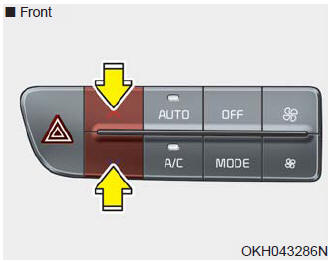
2.Press the TEMP button to set the desired temperature.
✽ NOTICE
- To turn the automatic operation off, select any of the following buttons: Mode selection button Air conditioning button Front windshield defroster button Air intake control button Fan speed control button The selected function will be controlled manually while other functions operate automatically.
- For your convenience and to improve the effectiveness of the climate control, use the AUTO button and set the temperature to 73°F (23°C).
✽ NOTICE
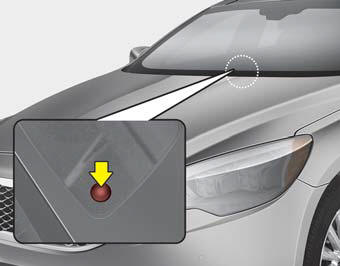
Never place anything over the sensor located on the instrument panel to ensure better control of the heating and cooling system.
 Automatic climate control system
1. Driver’s temperature control button
2. AUTO (automatic control) button
3. OFF button
4. Fan speed control button
5. Air conditioning button
6. Mode selection button
7. Front windshield ...
 Manual heating and air conditioning
The heating and cooling system can be controlled manually by pushing buttons
other than the AUTO button.
In this case, the system works sequentially according to the order of buttons
selected. Wh ...
See also:
Engine coolant
The high-pressure cooling system has a reservoir filled with year-round antifreeze
coolant. The reservoir is filled at the factory.
Check the antifreeze protection and coolant level at least once a ...
Parking Brake & Brake Fluid Warning Light
This warning light illuminates:
Once you set the ignition switch or Engine Start/Stop Button to the ON position.It
illuminates for approximately 3 seconds It remains on if the parking brake i ...
Owner maintenance schedule
When you stop for fuel:
Check the engine oil level.
Check coolant level in coolant reservoir.
Check the windshield washer fluid level.
Look for low or under-inflated tires.
WARNING
Be ca ...
Categories
