
 Kia K900: Description
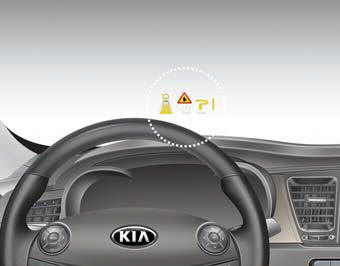
The head up display is a transparent display which projects a shadow of some information of the instrument cluster and navigation on the windshield glass.
The head up display image on the windshield glass may be invisible when:
Sitting posture is bad. Wearing polarized sunglasses. There is an object on the dash covering the Heads Up Display. Driving on a wet road. A light is turned on inside the vehicle. Light reflecting off the windshield in the area of the Head Up Display.
If the head up display image is not shown well, adjust the height or illumination of the head up display in the LCD display.
When the head up display needs inspection or repair, we recommend that you consult an authorized Kia dealer.
WARNING
Head Up Display
- Do not make the front windshield glass have window tint or other types of metallic coating. Otherwise, the head up display image may be invisible.
- Do not place any accessories on the clash pad or attach any objects on the windshield glass.
- As the Blind Spot Detection (BSD) system is a supplemental device that may help you drive safe, it may be dangerous to rely on only the BSD information of the head up display image when changing the lane. Always pay attention to drive safely.
CAUTION
When replacing the front windshield glass of the vehicles equipped with the head up display, replace it with a windshield glass designed for the head up display operation. Otherwise, duplicated images may be displayed on the windshield glass.

 Head Up Display ON/OFF
To activate the head up display, press the HUD button.
If you press the HUD button again, the head up display will be deactivated. ...
See also:
All season tires
Kia specifies all season tires on some models to provide good performance for
use all year round, including snowy and icy road conditions.
All season tires are identified by ALL SEASON and/or M+S ( ...
Blade inspection
✽ NOTICE
Commercial hot waxes applied by automatic car washes have been known to make
the windshield difficult to clean.
Contamination of either the windshield or the wiper blades with fo ...
Tire chains
Tire chains, if necessary, should be installed on the drive wheels (rear wheels).
Be sure that the chains are installed in accordance with the manufacturer's instructions.
To minimize tire and c ...
Categories
