
 Kia K900: LCD Modes
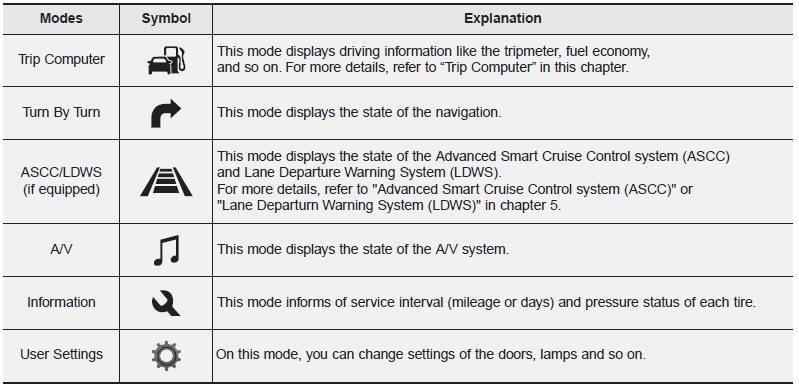
For controlling the LCD modes, refer to "LCD Display Control" in this chapter
 LCD Display
...
 Trip Computer Mode
This mode displays driving information like the tripmeter, fuel economy, and
so on. ...
See also:
License plate lamp replacement
If the light bulb does not operate, we recommend the vehicle be checked by an
authorized K900 Kia dealer.
A skilled technician should check or repair the license plate light, for it may
affect ...
With the door lock button
To unlock a door, push the door lock button (1) to the “Unlock” position.
The red mark (2) on the button will be visible.
To lock a door, push the door lock button (1) to the “Lock” ...
Pursuant to Code of Federal Regulations, Title 47, Part 15 ("FCC Rules")
Operation is subject to the following two conditions:
1.This device may not cause harmful interference, and
2.This device must accept any interference received, including interference that
may cau ...
Categories
