
 Kia K900: To decrease the crusie control set speed
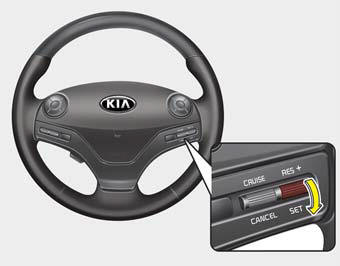
Follow either of these procedures:
- Move the lever down (to SET-), and hold it. Your vehicle set speed will decrease by 5 mph (10 km/h). Release the lever at the speed you want.
- Move the lever down (to SET-), and release it immediately. The cruising speed will decrease by 1 mph (1.0 km/h) each time you move the lever down (to SET-) in this manner.
- You can set the cruise control to any speed above 20 mph (30 km/h).
 To increase cruise control set speed
Follow either of these procedures:
Move the lever up (to RES+), and hold it. Your vehicle set speed will increase
by 5 mph (10 km/h). Release the lever at the speed you want.
Move the lever ...
 To temporarily accelerate with the cruise control on
If you want to speed up temporarily when the cruise control is on, depress the
accelerator pedal.
Increased speed will not interfere with cruise control operation or change the
set speed.
To ret ...
See also:
Climate control air filter
Filter inspection
The climate control air filter should be replaced every 15,000 miles (24,000
km). If the vehicle is operated in severely air-polluted cities or on dusty rough
roads for a long p ...
Vehicle certification label
The vehicle certification label attached on the driver’s side center pillar gives
the vehicle identification number (VIN). ...
Low aspect ratio tire
Low aspect ratio tires, whose aspect ratio is lower than 50, are provided for
sporty looks.
Because the low aspect ratio tires are optimized for handling and braking, it
may be more uncomfortable ...
Categories

Copyright © www.k900kia.com 2014-2026