
 Kia K900: On inclines
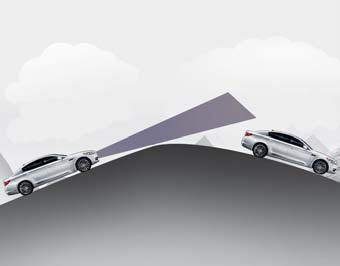
- During uphill or downhill driving, the ASCC may not detect a moving vehicle in your lane, and cause your vehicle to accelerate to the set speed. Also, the vehicle speed will rapidly slow down when the vehicle ahead is recognized suddenly.
- Select the appropriate set speed on inclines and adjust your vehicle speed by depressing the accelerator or brake pedal according to the road condition ahead and driving condition.
 On curves
On curves, the ASCC may not detect a moving vehicle in your lane, and then
your vehicle could accelerate to the set speed. Also, the vehicle speed will
rapidly slow down when the vehicle ahea ...
 Lane changing
A vehicle which moves into your lane from an adjacent lane cannot be recognized
by the sensor until it is in the sensor's detection range.
The sensor may not detect immediately when a ve ...
See also:
Rear vanity mirror
To use the rear vanity mirror, press the cover and it will slowly open and the
mirror lamp will turn on.
CAUTION
Close the mirror cover securely. If the mirror cover is not closed, the lamp
wi ...
Off
To turn off the engine (START/STOP position) or vehicle power (ON position),
press the ENGINE START/STOP button with the shift lever in the P (Park) position.
When you press the ENGINE START/STO ...
TPMS (Tire Pressure
Monitoring System)
malfunction indicator
The TPMS malfunction indicator will
illuminate after it blinks for approximately
one minute when there is a
problem with the Tire Pressure
Monitoring System.
Have the system checked by an
auth ...
Categories

Copyright © www.k900kia.com 2014-2026