
 Kia K900: Lumbar support (for rear right and left passenger’s seat)
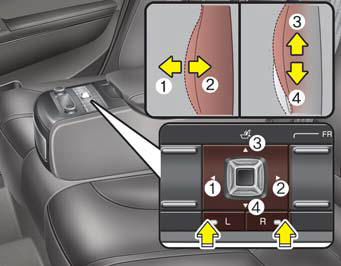
- For right side
:
Press the R switch.
The lumbar support can be adjusted by pushing the lumbar support lever.
Push the lever to left side (1) increase support or push the lever to the right side (2) to decrease support.
To move the support position up or down, push the lever upside (3) or down side (4).
- For left side
:
Press the L switch.
The lumbar support can be adjusted by pushing the lumbar support lever.
Push the lever to left side (1) increase support or push the lever to the right side (2) to decrease support.
To move the support position up or down, push the lever upside (3) or down side (4).
 Additional switches for adjusting the front passenger seat
The switch is located in the armrest of the rear seat.
To adjust the position of front passenger’s seat ;
Press the control switch forward (1) or rearward (2) to move the seat to the
desired p ...
 Rear switches operating limitation
You can activate or deactivate the rear seat control, rear audio control and
climate control by using the REAR LOCK button on the rear armrest or “System Settings”
in the AVN (Audio, Video, ...
See also:
Summer tires
Kia specifies summer tires on some models to provide superior performance on
dry roads. Summer tire performance is substantially reduced in snow and ice. Summer
tires do not have the tire traction ...
Trip Computer Mode
This mode displays driving information like the tripmeter, fuel economy, and
so on. ...
Trunk Open Warning Light
This warning light illuminates:
When the trunk is not closed securely. ...
Categories
