
 Kia K900: LCD Modes
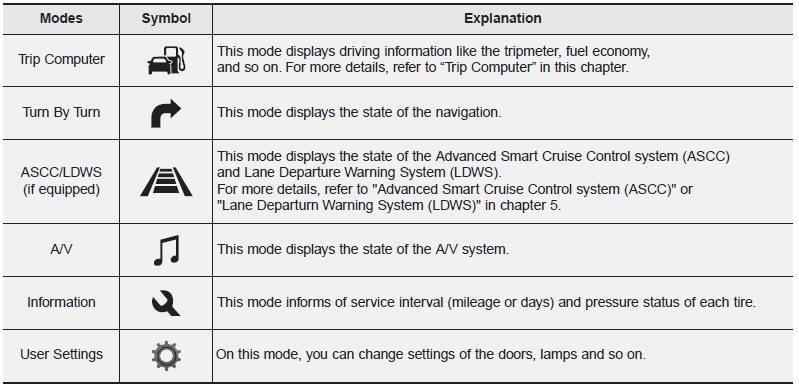
For controlling the LCD modes, refer to "LCD Display Control" in this chapter
 LCD Display
...
 Trip Computer Mode
This mode displays driving information like the tripmeter, fuel economy, and
so on. ...
See also:
Automatic transmission operation
The automatic transmission has 8 forward speeds and one reverse speed. The individual
speeds are selected automatically, depending on the position of the shift lever.
✽ NOTICE
The first few ...
Bag hanger
Pull the strap (1) to hang a bag on the hook (2).
When you are not using the hook, fold the hook.
CAUTION
Do not hang heavy things, since those may damage the hook. ...
Checking the amount of air conditioner refrigerant and compressor lubricant
When the amount of refrigerant is low, the performance of the air conditioning
is reduced. Overfilling also has a negative impact on the air conditioning system.
Therefore, if abnormal operation is ...
Categories
