
 Kia K900: Closing the sunroof
To close the sunroof glass only
Push the sunroof control lever forward to the first detent position or pull the lever downward.
To close the sunroof glass with the sunshade
Push the sunroof control lever forward to the second detent position. The sunroof glass will close, then the sunshade close automatically.
To stop the sunroof movement at any point, pull or push the sunroof control lever momentarily.
Automatic reversal
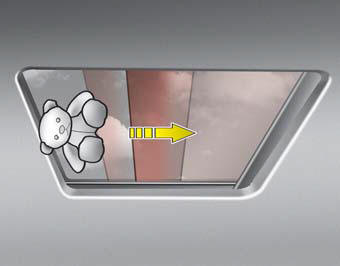
If an object or part of the body is detected while the sunroof glass or sunshade is closing automatically, it will reverse the direction, and then stop.
The auto reverse function does not work if a tiny obstacle is between the sliding glass or sunshade and the sunroof sash. You should always check that all passengers and objects are away from the sunroof before closing it.
WARNING
Sunroof
Do not extend the face, neck, arms or body outside through the sunroof opening while driving or operating the sunroof.
CAUTION
- Periodically remove any dirt that may accumulate on the guide rail.
- If you try to open the sunroof when the temperature is below freezing or when the sunroof is covered with snow or ice, the glass or the motor could be damaged.
 Sliding the sunroof
When the sunshade is closed
If you pull the sunroof control lever backward to the second detent position,
the sunshade will slide all the way open, then the sunroof glass will slide all
the way ...
 Tilting the sunroof
When the sunshade is closed
If you push the sunroof control lever upward, the sunshade will slide all the
way open, then the sunroof glass will tilt.
To stop the sunroof movement at any point, p ...
See also:
Certification label
The certification label is located on the driver's door sill at the center pillar.
This label shows the maximum allowable weight of the fully loaded vehicle. This
is called the GVWR (Gross Ve ...
Seat Belt Warning Light
This warning light informs the driver that the seat belt is not fastened. ...
Illuminated Engine Start/Stop button
Whenever the front door is opened, the ENGINE START/STOP button will illuminate
for your convenience.
The light will go off after about 30 seconds after the door is closed. ...
Categories
