
 Kia K900: Lane changing
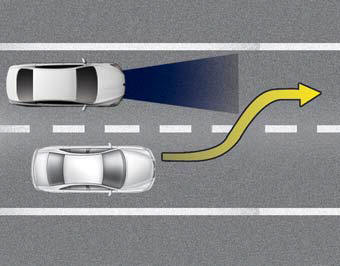
- A vehicle which moves into your lane from an adjacent lane cannot be recognized by the sensor until it is in the sensor's detection range.
- The sensor may not detect immediately when a vehicle cuts in suddenly. Always pay attention to the traffic, road and driving conditions.
- If a vehicle which moves into your lane is slower than your vehicle, your speed may decrease to maintain the distance to the vehicle ahead.
- If a vehicle which moves into your lane is faster than your vehicle, your vehicle will accelerate to the selected speed.
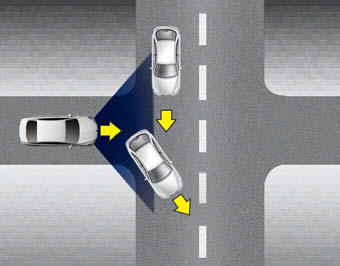
- Your vehicle may accelerate when a vehicle ahead of you disappears.
- When you are warned that the vehicle ahead of you is not detected, drive with caution.
 On inclines
During uphill or downhill driving, the ASCC may not detect a moving vehicle
in your lane, and cause your vehicle to accelerate to the set speed. Also, the
vehicle speed will rapidly slow do ...
 Vehicle recognition
Some vehicles ahead in your lane cannot be recognized by the sensor as follows:
- Narrow vehicles such as motorcycles or bicycles
- Vehicles offset to one side
- Slow-moving vehicles or suddendec ...
See also:
Fuel Economy
...
Front passenger’s seat
(7) Seat sliding forward or backward/ Seat height and cushion tilting adjustment
(8) Seatback angle adjustment
(9) Headrest height adjustment ...
Hazard warning flasher
The hazard warning flasher serves as a warning to other drivers to exercise extreme
caution when approaching, overtaking, or passing your vehicle.
It should be used whenever emergency repairs are ...
Categories

Copyright © www.k900kia.com 2014-2026