
 Kia K900: To set vehicle to vehicle distance
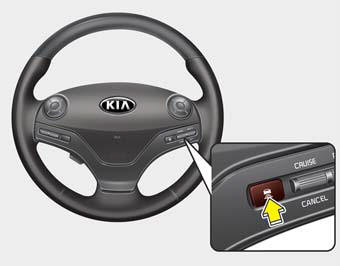
This function allows you to program the vehicle to maintain relative distance to the vehicle ahead without depressing the accelerator pedal or brake pedal.
The vehicle to vehicle distance will automatically activate when the ASCC is on.
Select the appropriate distance according to road conditions and vehicle speed.
Each time the button is pressed, the vehicle to vehicle distance changes as follows:
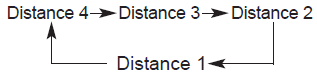
For example, if you drive at 56 mph (90 km/h), the distance is maintained as follows;
Distance 4 - approximately 172 feet (52.5 m)
Distance 3 - approximately 130 feet (40 m)
Distance 2 - approximately 106 feet (32.5 m)
Distance 1 - approximately 82 feet (25 m)
✽ NOTICE
The 'Distance 4' is always set when the system is used for the first time after starting the engine.
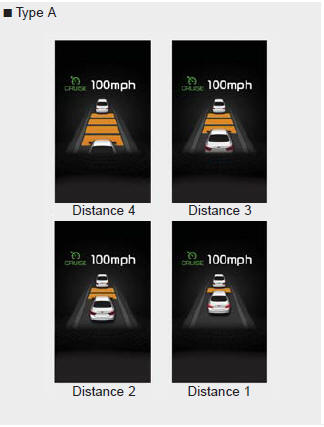
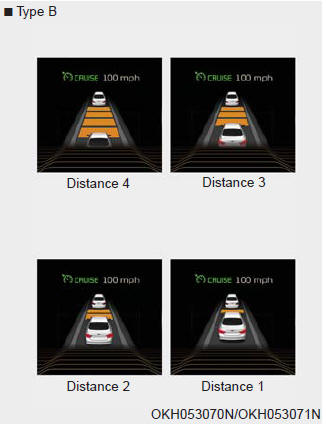
- The vehicle will maintain the set speed, when the lane ahead is clear.
- The vehicle will slow down or speed up within selected speed to maintain the selected distance, when there is a vehicle ahead of you in the lane. (A vehicle will appear in front of your vehicle in the LCD display only when there is an actual vehicle in front of you)
- If the vehicle ahead speeds up, your vehicle will travel at a steady cruising speed after accelerating to the selected speed.
CAUTION
- The warning chime sounds and malfunction indicator blinks if it is hard to maintain the selected distance to the vehicle ahead.
- If the warning chime sounds, actively adjust the vehicle speed by depressing the brake pedal according to the road condition ahead and driving condition.
- Even if the warning chime is not activated, always pay attention to the driving conditions to prevent dangerous situations from occurring.
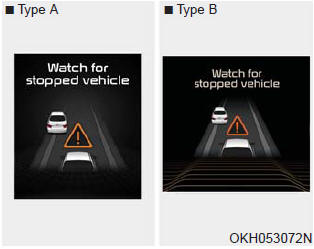
CAUTION
If the vehicle ahead (vehicle speed: less than 20 mph (30 km/h)) disappears to the next lane, the warning chime will sound and a message will appear. Adjust your vehicle speed for vehicles or objects that can suddenly appear in front of you by depressing the brake pedal according to the road condition ahead and driving condition.

 In traffic situation
In traffic, your vehicle will stop if the vehicle ahead of you stops. Also, if
the vehicle ahead of you starts moving, your vehicle will start as well.
However, if the vehicle stops for more than ...
See also:
RCTA (Rear cross traffic alert)
When your vehicle moves backwards from a parking position, the sensor detects
approaching vehicles to the left or right side direction and gives information to
the driver.
Operating conditions
...
Elapsed Time (3)
The elapsed time is the total driving time since the last elapsed time reset.
Time range (hh:mm): 00:00 ~ 99:59
To reset the elapsed time, press the OK (RESET) button on the steering wheel
...
Removable towing hook
1.Open the trunk, and remove the towing hook from the tool case.
2.Remove the hole cover by pressing the lower part of the cover on the front
or rear bumper.
3.Install the towing hook by turning ...
Categories
