
 Kia K900: Surround view monitoring system (SVM)
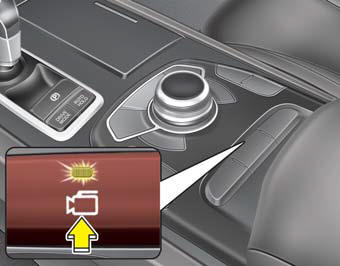
The Surround View Monitoring System (SVM) is not a substitute for proper and safe parking procedures.
The Surround View Monitoring System (SVM) may not detect every object surrounding the vehicle. Always drive safely and use caution when parking.
The Surround View Monitoring System (SVM) can assist in parking by allowing the driver to see around the vehicle. Push the button into the [ON] position to operate the system. To cancel the system, push the button again.
Operating conditions When the Engine Start/Stop Button is ON position When the transaxle is on D, N or R When the vehicle speed is not over 12.4 mph (20km/h)
- When the vehicle speed is over 12.4mph (20km/h), the SVM system is turned off. If the vehicle speed is not over 12.4mph (20km/h) after turning off the SVM by over speed, the SVM is not turned on. To operate again, push the button.
- When the vehicle moves backwards, regardless of On/Off of button and vehicle speed, the SVM is operated.
- When the trunk and driver/passenger door are opened and the outside mirror is folded, the warning is illuminated in SVM system.
- If the SVM system is not operating normally, the system should be checked by an authorized K900 Kia dealer.
WARNING
This system is a supplementary function only. It is the responsibility of the driver to always check the area around the vehicle before and while moving.
 Front blind spot monitoring system
The Blind Spot Detection System is not a substitute for proper and safe lane
changing procedures. Always drive safely and use caution when changing lanes. The
Blind Spot Detection System may not ...
 Welcome system
...
See also:
Reset items
Items should be reset after the battery has been discharged or the battery has
been disconnected.
Auto up/down window (See section 4)
Sunroof (See section 4)
Driver position memory system (S ...
Push-starting
Vehicles equipped with automatic transmission cannot be push-started.
Follow the directions in this section for jump-starting.
WARNING
Never tow a vehicle to start it because the sudden surge forwa ...
Start/Run
To start the engine, depress the brake pedal and press the ENGINE START/STOP
button with the shift lever in the P (Park) or the N (Neutral) position. For your
safety, start the engine with the s ...
Categories
