
 Kia K900: Transmission ranges
The indicator in the instrument cluster displays the shift lever position when the Engine Start/Stop Button is in the ON position.
P (Park)
Always come to a complete stop before shifting into P (Park). This position locks the transmission and prevents the drive wheels from rotating.
Shifting into P (Park) while the vehicle is in motion will cause the drive wheels to lock which will cause you to lose control of the vehicle.
R (Reverse)
Use this position to drive the vehicle backward.
CAUTION
Always come to a complete stop before shifting into or out of R (Reverse); you may damage the transmission if you shift into R (Reverse) while the vehicle is in motion, except as explained in “Rocking the vehicle” in this section.
N (Neutral)
The wheels and transmission are not engaged. The vehicle will roll freely even on the slightest incline unless the parking brake or service brakes are applied.
D (Drive)
This is the normal forward driving position. The transmission will automatically shift through a 8-gear sequence, providing the best fuel economy and power.
For extra power when passing another vehicle or climbing grades, depress the accelerator fully, at which time the transmission will automatically downshift to the next lower gear.
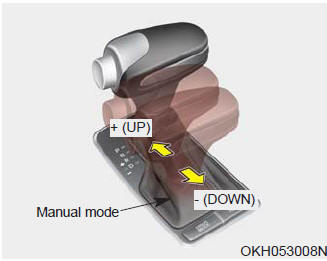
Manual mode
Whether the vehicle is stationary or in motion, sports mode is selected by pushing the shift lever from the D (Drive) position into the manual gate.
To return to D (Drive) range operation, push the shift lever back into the main gate.
In manual mode, moving the shift lever backwards and forwards will allow you to make gearshifts rapidly.
Up (+) :
Push the lever forward once to shift up one gear.
Down (-) :
Pull the lever backwards once to shift down one gear.
✽ NOTICE
- In manual mode, the driver must execute upshifts in accordance with road conditions, taking care to keep the engine speed below the red zone.
- In manual mode, only the 8 forward gears can be selected. To reverse or park the vehicle, move the shift lever to the R (Reverse) or P (Park) position as required.
- In manual mode, downshifts are made automatically when the vehicle slows down. When the vehicle stops, 1st gear is automatically selected.
- In manual mode, when the engine rpm approaches the red zone shift points are varied to upshift automatically.
- To maintain the required levels of vehicle performance and safety, the system may not execute certain gearshifts when the shift lever is operated.
- When driving on a slippery road, push the shift lever forward into the +(up) position. This causes the transmission to shift into the 2nd gear which is better for smooth driving on a slippery road. Push the shift lever to the -(down) side to shift back to the 1st gear.
 Automatic transmission operation
The automatic transmission has 8 forward speeds and one reverse speed. The individual
speeds are selected automatically, depending on the position of the shift lever.
✽ NOTICE
The first few ...
 Shift lock system
For your safety, the automatic transmission has a shift lock system which prevents
shifting the transmission from P (Park) into R (Reverse) unless the brake pedal
is depressed.
To shift the trans ...
See also:
Automatic turn off function
The interior lights automatically turn off approximately 20 minutes after the
engine is turned off.
If your vehicle is equipped with the theft alarm system, the interior lights
automatically turn ...
Opening the hood
1.Pull the release lever to unlatch the hood. The hood should pop open slightly.
Open the hood after turning off the engine on a flat surface, shifting the shift
lever to the P (Park) position fo ...
Transaxle Shift Indicator
Automatic Transaxle Shift Indicator
This indicator displays which automatic transaxle shift lever is selected.
Park : P
Reverse : R
Neutral : N
Drive : D
Sports Mode : 1, 2, 3, 4, 5, 6, ...
Categories
