
 Kia K900: Overview
Description
The trip computer is a microcomputer- controlled driver information system that displays information related to driving.
✽ NOTICE
Some driving information stored in the trip computer (for example Average Vehicle Speed) resets if the battery is disconnected.
Trip Modes
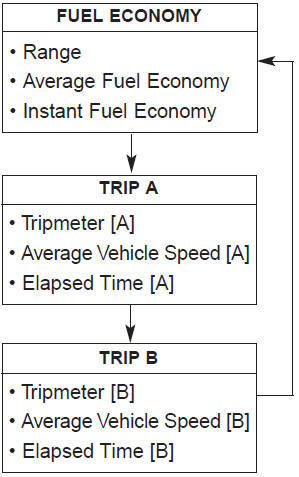
To change the trip mode, press the
 ,
,
(MOVE) button.
 Trip computer
...
 Fuel Economy
...
See also:
Smooth cornering
Avoid braking or gear changing in corners, especially when roads are wet. Ideally,
corners should always be taken under gentle acceleration. If you follow these suggestions,
tire wear will be he ...
Additional switches for adjusting the front passenger seat
The switch is located in the armrest of the rear seat.
To adjust the position of front passenger’s seat ;
Press the control switch forward (1) or rearward (2) to move the seat to the
desired p ...
Condition and operation in the front passenger occupant detection system
*1 : The system judges a person of adult size as an adult. When a smaller adult
sits in the front passenger seat, the system may recognize him/her as a child depending
on his/her physique and po ...
Categories
