
 Kia K900: Lumbar support (for rear right and left passenger’s seat)
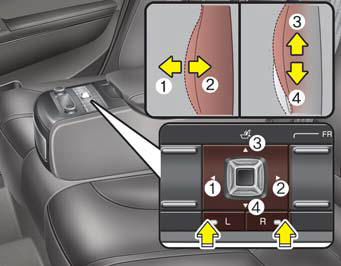
- For right side
:
Press the R switch.
The lumbar support can be adjusted by pushing the lumbar support lever.
Push the lever to left side (1) increase support or push the lever to the right side (2) to decrease support.
To move the support position up or down, push the lever upside (3) or down side (4).
- For left side
:
Press the L switch.
The lumbar support can be adjusted by pushing the lumbar support lever.
Push the lever to left side (1) increase support or push the lever to the right side (2) to decrease support.
To move the support position up or down, push the lever upside (3) or down side (4).
 Additional switches for adjusting the front passenger seat
The switch is located in the armrest of the rear seat.
To adjust the position of front passenger’s seat ;
Press the control switch forward (1) or rearward (2) to move the seat to the
desired p ...
 Rear switches operating limitation
You can activate or deactivate the rear seat control, rear audio control and
climate control by using the REAR LOCK button on the rear armrest or “System Settings”
in the AVN (Audio, Video, ...
See also:
Auto Defogging System
Auto Defogging reduces the probability of fogging up the inside of the windshield
by automatically sensing the moisture of inside the windshield.
The Auto Defogging System operates when the heate ...
Theft-alarm system
This system is designed to provide protection from unauthorized entry into the
vehicle. This system is operated in three stages: the first is the "Armed" stage,
the second is the " ...
Luggage net (holder)
To keep items from shifting in the cargo area, you can use the holders located
in the cargo area to attach the luggage net.
CAUTION
To prevent damage to the goods or the vehicle, care should be ...
Categories
