
 Kia K900: Front lamp switch
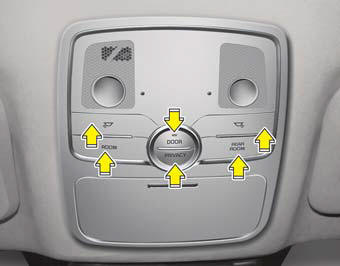
-
 :
:Press the button
to turn the lamp on. This light produces a spot beam for convenient use as a map lamp at night or as a personal lamp for the driver and the front passenger. To turn the lamp off, press the button again. - ROOM :
Press the button to turn the front and rear lamp on. To turn the lamp off, press the button again.
- REAR ROOM :
Press the button to turn the rear lamp on. To turn the lamp off, press the button again.
- DOOR :
Press the button to operate the door mode. The indicator on the button will illuminate and lamps will turn on or off as follows: The front and rear lamp comes on when a door is opened. If the door is closed, the lamps will go out in 30 seconds. The front and rear lamp comes on for approximately 30 seconds when doors are unlocked with the smart key as long as the doors are not opened. The front and rear lamp will stay on for approximately 20 minutes if a door is opened with the engine start/stop button in the ACC or OFF position. The front and rear lamp will stay on continuously if the door is opened with the engine start/stop button in the ON position. The front and rear lamp will go out immediately if the engine start/stop button is changed to the ON position or all doors are locked. To turn off the door mode, press the button again. The indicator on the button will turn off.
- PRIVACY :
Press the button to operate the privacy mode. The indicator on the button will illuminate and lamps will turn on or off as follows: If you open any door, the lamp for the open door will illuminate. To turn off the privacy mode, press the button again. The indicator on the button will turn off.
 Automatic turn off function
The interior lights automatically turn off approximately 20 minutes after the
engine is turned off.
If your vehicle is equipped with the theft alarm system, the interior lights
automatically turn ...
 Rear lamp switch
Type A
: Press the button to
turn the lamp on. This light produces a spot beam for convenient use as a map
lamp at night or as a personal lamp for the driver and the front passenger.
To ...
See also:
Good driving practices
Never move the shift lever from P (Park) or N (Neutral) to any other position
with the accelerator pedal depressed.
Never move the shift lever into P (Park) when the vehicle is in motion.
Sl ...
Tire pressure monitoring system (TPMS)
(1) Low Tire Pressure Telltale/TPMS Malfunction Indicator
(2) Low Tire Pressure Position Telltale (shown on the LCD display)
Each tire, including the spare (if provided), should be checked monthly ...
Bluetooth® Wireless Technology hands-free
You can use the phone wirelessly by using the Bluetooth® Wireless Technology.
1. Call / Answer lever
2. Call end lever
3. Microphone
Detailed information for the Bluetooth® Wireless Technology ...
Categories
