
 Kia K900: Temperature control
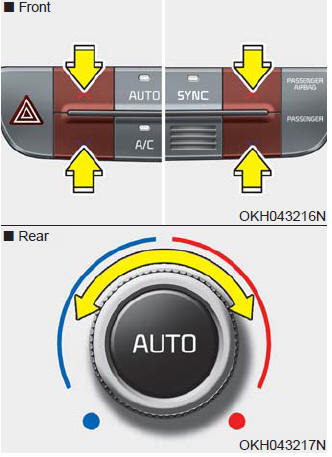
The temperature will increase to the maximum (HI) by pushing the up ( )
)
button (for front) or turn the knob to the right (for rear).
The temperature will decrease to the minimum (Lo) by pushing the down (
 ) button (for front) or turn the knob
to the left (for rear).
When pushing the button (for front) or turning the knob (for rear), the temperature will increase or decrease by 0.5°C/1°F. When set to the lowest temperature setting, the air conditioning will operate continuously.
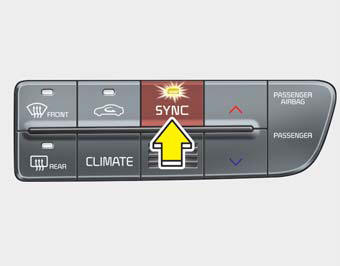
Adjusting the driver, passenger and rear side temperature equally
1. Press the SYNC button to activate SYNC mode. The passenger and rear side temperature will be set to the same temperature as the driver side temperature.
2. Press the driver side temperature control button. The driver, passenger and rear side temperature will be adjusted equally.
Adjusting the driver, passenger and rear side temperature individually
- Press the SYNC button again to operate the driver, passenger and rear side temperature individually.
- Pressing the passenger side temperature control button will automatically cancel the SYNC mode. At this time, rear side temperature will be set to the same temperature as the driver side.
- Turning the rear temperature control knob will automatically cancel the SYNC mode. At this time, passenger side temperature will be set to the same temperature as the driver side.
Temperature conversion
You can switch the temperature mode from Centigrade to Fahrenheit as follows:
While pressing the OFF button, press the AUTO button for 3 seconds or more.
The display will change from Centigrade to Fahrenheit, or from Fahrenheit to Centigrade.
If the battery has been discharged or disconnected, the temperature mode display will reset to Fahrenheit.
 Mode selection
The mode selection button controls the direction of the air flow through the
ventilation system.
The air flow outlet port is converted as follows:
Face-Level (B, C, D, E, F, G)
Air flow is ...
 Air intake control
This is used to select the outside (fresh) air position or recirculated air position.
To change the air intake control position, push the control button.
Recirculated air position
With the reci ...
See also:
Recommended lubricants and capacities
To help achieve proper engine and powertrain performance and durability, use
only lubricants of the proper quality.
The correct lubricants also help promote engine efficiency that results in improv ...
Advanced Smart Cruise Control (ASCC) Warning Light
This warning light illuminates :
When there is a malfunction with the advanced smart cruise control system.
In this case, have your vehicle inspected by an authorized K900 Kia dealer. ...
Interior care
Interior general precautions
Prevent chemicals such as perfume, cosmetic oil, sun cream, hand cleaner, and
air freshener from contacting the interior parts because they may cause damage or
discol ...
Categories
