
 Kia K900: Rear camera display
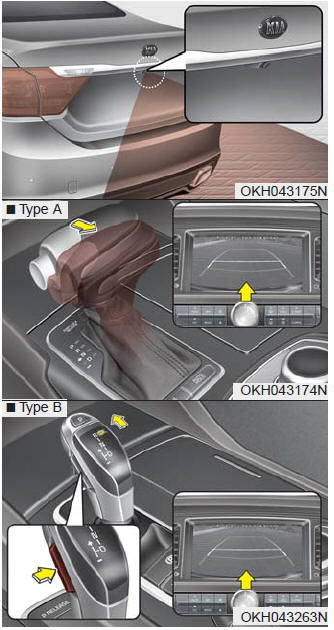
The Rear-Camera Display is not a substitute for proper and safe backing- up procedures. The Rear-Camera Display may not display every object behind the vehicle. Always drive safely and use caution when backing up.
The rear camera display will activate when the back-up light is ON with the Engine Start/Stop Button ON and the shift lever in the R (Reverse) position.
This system is a supplemental system that shows behind the vehicle through the navigation display while backing up.
Always keep the camera lens clean. If the lens is covered with foreign matter, the camera may not operate normally.
WARNING
Rear camera display
The rear camera display is not a safety device. It only serves to assist the driver in identifying objects directly behind the middle of the vehicle. The camera does NOT cover the complete area behind the vehicle.
WARNING
Relying on the Rear- Camera Display
Never rely solely on the rear camera display when backing-up.
WARNING
- This system is a supplementary function only. It is the responsibility of the driver to always check the area behind the vehicle before and while backing up.
- Always keep the camera lens clean. If the lens is covered with foreign matter, the camera may not operate normally.
 Self-diagnosis
If you don’t hear an audible warning sound or if the buzzer sounds intermittently
when shifting the shift lever into the R (Reverse) position, this may indicate a
malfunction in the parking assi ...
 Parking guide system
The Parking Guide System is not a substitute for proper and safe parking procedures.
The Parking Guide System may not detect every object surrounding the vehicle. Always
drive safely and use cau ...
See also:
Owner maintenance
The following lists are vehicle checks and inspections that should be performed
by the owner or an authorized K900 Kia dealer at the frequencies indicated to help
ensure safe, dependable operation ...
Forward and backward
Push the control switch forward or backward to move the seat to the desired position.
Release the switch once the seat reaches the desired position. ...
Rear window defroster
The defroster heats the window to remove frost, fog and thin ice from the rear
window, while the engine is running.
To activate the rear window defroster, press the rear window defroster button
...
Categories
