
 Kia K900: Heated steering wheel
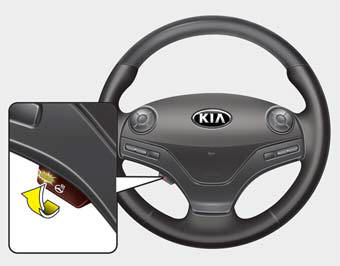
When the Engine Start/Stop Button is in the ON position, press the heated steering wheel button to warm the steering wheel. The indicator on the button will illuminate.
To turn the heated steering wheel off, press the button once again. The indicator on the button will turn off and notify you on the LCD display.
CAUTION
Do not install any grip to operate the steering wheel. This causes damage to the heated steering wheel system.
WARNING
If the steering wheel becomes too warm, turn the system off. The heated steering wheel may cause burns even at low temperatures, especially if used for long periods of time.
 Tilt Steering/Telescope Steering
Adjust the steering wheel angle (2) and position (3) with the knob (1) on the
steering column. Move the steering wheel, so it points toward your chest, not toward
your face.
Make sure you can ...
 Horn
Horn
To sound the horn, press the horn symbol on your steering wheel. Check the horn
regularly to be sure it operates properly.
To sound the horn, press the area indicated by the horn symbol on your s ...
See also:
Emergency towing
If towing is necessary, have it done by an authorized K900 Kia dealer or a commercial
tow truck service.
If towing service is not available in an emergency, your vehicle may be temporarily
towe ...
22,500 miles (36,000 km) or 18 months
Rotate tires
Inspect air cleaner filter
Inspect vacuum hose
Inspect power steering fluid
Inspect fuel lines, fuel hoses and connections
Inspect vapor hose and fuel filler cap
Inspect fu ...
Use approved window washer anti-freeze in system
To keep the water in the window washer system from freezing, add an approved
window washer anti-freeze solution in accordance with instructions on the container.
Window washer anti-freeze is avail ...
Categories
