
 Kia K900: Temperature control
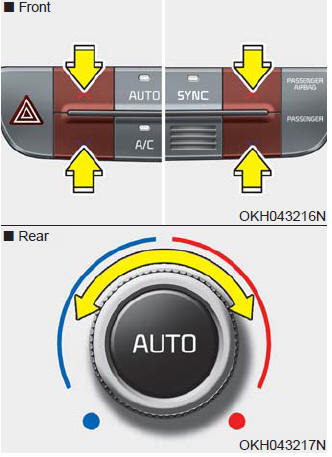
The temperature will increase to the maximum (HI) by pushing the up ( )
)
button (for front) or turn the knob to the right (for rear).
The temperature will decrease to the minimum (Lo) by pushing the down (
 ) button (for front) or turn the knob
to the left (for rear).
When pushing the button (for front) or turning the knob (for rear), the temperature will increase or decrease by 0.5°C/1°F. When set to the lowest temperature setting, the air conditioning will operate continuously.
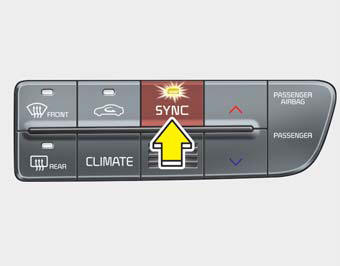
Adjusting the driver, passenger and rear side temperature equally
1. Press the SYNC button to activate SYNC mode. The passenger and rear side temperature will be set to the same temperature as the driver side temperature.
2. Press the driver side temperature control button. The driver, passenger and rear side temperature will be adjusted equally.
Adjusting the driver, passenger and rear side temperature individually
- Press the SYNC button again to operate the driver, passenger and rear side temperature individually.
- Pressing the passenger side temperature control button will automatically cancel the SYNC mode. At this time, rear side temperature will be set to the same temperature as the driver side.
- Turning the rear temperature control knob will automatically cancel the SYNC mode. At this time, passenger side temperature will be set to the same temperature as the driver side.
Temperature conversion
You can switch the temperature mode from Centigrade to Fahrenheit as follows:
While pressing the OFF button, press the AUTO button for 3 seconds or more.
The display will change from Centigrade to Fahrenheit, or from Fahrenheit to Centigrade.
If the battery has been discharged or disconnected, the temperature mode display will reset to Fahrenheit.
 Mode selection
The mode selection button controls the direction of the air flow through the
ventilation system.
The air flow outlet port is converted as follows:
Face-Level (B, C, D, E, F, G)
Air flow is ...
 Air intake control
This is used to select the outside (fresh) air position or recirculated air position.
To change the air intake control position, push the control button.
Recirculated air position
With the reci ...
See also:
Light bulbs
WARNING
Working on the lights
Prior to working on the light, firmly apply the parking brake, ensure that
the ignition switch is turned to the LOCK position and turn off the lights to avoid
sudde ...
Engine Coolant Temperature Warning Light
This warning light illuminates:
When the engine coolant temperature is above 248°F (120°C). This means that
the engine is overheated and may be damaged. If your vehicle is overheated,
re ...
Luggage net (holder)
To keep items from shifting in the cargo area, you can use the holders located
in the cargo area to attach the luggage net.
CAUTION
To prevent damage to the goods or the vehicle, care should be ...
Categories
