
 Kia K900: Locking
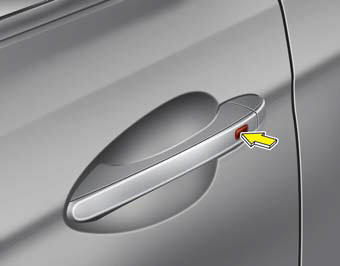
Pressing the button of the front outside door handles with all doors closed and any door unlocked, locks all the doors. The hazard warning lights will blink and the chime will sound once to indicate that all doors are locked.
The button will only operate when the smart key is within 0.7~1 m (28~40 in.) from the outside door handle. If you want to make sure that a door has locked or not, you should check the door lock button inside the vehicle or pull the outside door handle.
In some instances, when the outside door button is selected, the doors will not lock and an audible chime will sound for 3 seconds if any of the following occurs:
- The smart key is in the vehicle.
- The ignition switch is in the ACC or ON position.
- Any door except the trunk is opened.
 Smart key functions
1. Door lock
2. Door unlock
3. Trunk open
4. Panic alarm
With smart key, you can lock or unlock doors (and trunk) and start the engine
without inserting the key. Refer to the following ...
 Unlocking
Pressing the button of the driver's (or front passenger’s) outside door handle
with all doors closed and locked, unlocks the driver's door.
If you press the button of the driver's out ...
See also:
22,500 miles (36,000 km) or 18 months
Rotate tires
Inspect air cleaner filter
Inspect vacuum hose
Inspect power steering fluid
Inspect fuel lines, fuel hoses and connections
Inspect vapor hose and fuel filler cap
Inspect fu ...
Pursuant to Code of Federal Regulations, Title 47, Part 15 ("FCC Rules").
Operation is subject to the following two conditions:
1.This device may not cause harmful interference, and
2.This device must accept any interference received, including interference that
may cau ...
Electronic stability control (ESC)
The Electronic Stability control (ESC) system is designed to stabilize the vehicle
during cornering maneuvers. ESC checks where you are steering and where the vehicle
is actually going. ESC appl ...
Categories
