
 Kia K900: Front fog light
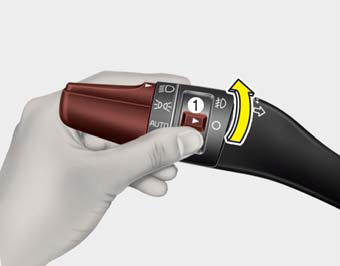
Fog lights are used to provide improved visibility when visibility is poor due to fog, rain or snow, etc.
1. Turn on the head light.
2. Turn the light switch (1) to the front fog light position.
3. To turn off the front fog light, turn the light switch to the front fog light position again or turn off the head light.
CAUTION
When in operation, the fog lights consume large amounts of vehicle electrical power. Only use the fog lights when visibility is poor or unnecessary battery and generator drain could occur.
 Turn signals and lane change signals
The Engine Start/Stop Button must be ON position for the turn signals to function.
To turn on the turn signals, move the lever up or down (A). The green arrow indicators
on the instrument panel ...
 Headlight leveling device
Automatic type
It is automatically adjusted the headlight beam level according to the number
of the passengers and the loading weight in the luggage area.
And it offers the proper headlight beam u ...
See also:
System warning
If you try to drive off depressing the accelerator pedal with the EPB applied,
but doesn't release automatically, a warning will sound and a message will appear.
If the driver's seat ...
Turn Signal Indicator Light
This indicator light blinks:
When you turn the turn signal light on. If any of the following occurs, there
may be a malfunction with the turn signal system. In this case, have your vehicle
insp ...
Aux, USB and iPod® port
If your vehicle has an aux and/or USB(universal serial bus) port or iPod® port,
you can use an aux port to connect audio devices and a USB port to plug in a USB,
and an iPod® port to plug in a ...
Categories
