
 Kia K900: Turn signals and lane change signals
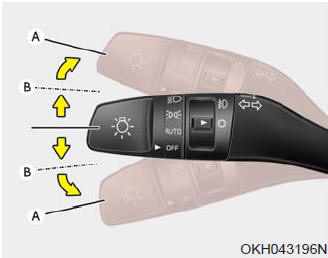
The Engine Start/Stop Button must be ON position for the turn signals to function. To turn on the turn signals, move the lever up or down (A). The green arrow indicators on the instrument panel indicate which turn signal is operating.
They will self-cancel after a turn is completed. If the indicator continues to flash after a turn, manually return the lever to the OFF position.
To signal a lane change, move the turn signal lever slightly and hold it in position (B). The lever will return to the OFF position when released.
If an indicator stays on and does not flash or if it flashes abnormally, one of the turn signal bulbs may be burned out and will require replacement.
One-touch lane change function
To activate an one-touch lane change function, move the turn signal lever slightly and then release it. The lane change signals will blink 3, 5 or 7 times.
✽ NOTICE
If an indicator flash is abnormally quick or slow, a bulb may be burned out or have a poor electrical connection in the circuit.
 High beam operation
To turn on the high beam headlights, push the lever away from you. Pull it back
for low beams.
The high beam indicator will illuminate when the headlight high beams are switched
on.
To prevent ...
 Front fog light
Fog lights are used to provide improved visibility when visibility is poor due
to fog, rain or snow, etc.
1. Turn on the head light.
2. Turn the light switch (1) to the front fog light position. ...
See also:
Wheel replacement
When replacing the metal wheels for any reason, make sure the new wheels are
equivalent to the original factory units in diameter, rim width and offset.
✽ NOTICE
The front tire size is diff ...
Steering wheel audio control
The steering wheel audio control button is installed to promote safe driving.
CAUTION
Do not operate audio remote control buttons simultaneously.
Volume (VOL + / VOL -) (1)
Press the up butto ...
Engine compartment fuse panel (Passenger’s side)
✽ NOTICE
Not all fuse panel descriptions in this manual may be applicable to your vehicle.
It is accurate at the time of printing. When you inspect the fuse panel in your
vehicle, refer ...
Categories
