
 Kia K900: With the door lock button
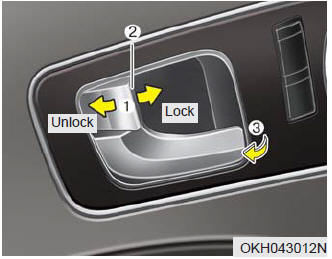
- To unlock a door, push the door lock button (1) to the “Unlock” position. The red mark (2) on the button will be visible.
- To lock a door, push the door lock button (1) to the “Lock” position. If the door is locked properly, the red mark (2) on the door lock button will not show.
- To open a door, pull the door handle (3) outward.
- If the inner door handle of the front door is pulled when the door lock button is in the lock position, the button will unlock and the door will open.
- Front doors cannot be locked if the smart key is in the vehicle and any front door is opened.
If a power door lock ever fails to function while you are in the vehicle, try one or more of the following techniques to exit:
- Operate the door unlock feature repeatedly (both electronic and manual) while simultaneously pulling on the door handle.
- Operate the other door locks and handles, front and rear.
- Lower a front window and use the key to unlock the door from outside.

 Rear door lock button
To lock a rear door, press the door lock button (1). The indicator on the
button will illuminate.
To unlock a rear door, press the door unlock button (2). The indicator on
the button will ...
See also:
Emission control system
The emission control system of your vehicle is covered by a written limited warranty.
Please see the warranty information contained in the Warranty & Maintenance booklet
in your vehicle.
Your ...
Tilting the sunroof
When the sunshade is closed
If you push the sunroof control lever upward, the sunshade will slide all the
way open, then the sunroof glass will tilt.
To stop the sunroof movement at any point, p ...
Checking the coolant level
WARNING
Removing radiator cap
Never attempt to remove the radiator cap while the engine is operating
or hot. Doing so might lead to cooling system and engine damage and could result
in se ...
Categories
