
 Kia K900: Remote keyless entry system operations
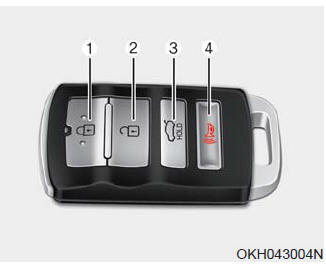
Lock (1)
All doors are locked if the lock button is pressed. If all doors (and trunk) are closed, the hazard warning lights will blink once to indicate that all doors (and trunk) are locked.
Also, if the lock button is pressed once more within 4 seconds, the hazard warning lights will blink and the chime will sound once to confirm that the door is locked.
However, if any door remains open, the hazard warning lights (and/or the chime) will not operate. But if all doors are closed after the lock button is pressed, the hazard warning lights will blink once.
Unlock (2)
The driver's door is unlocked if the unlock button is pressed once. The hazard warning lights will blink (for smart key, the chime also sounds) twice to indicate that the driver's door is unlocked.
All doors are unlocked if the unlock button is pressed once more within 4 seconds. The hazard warning lights will blink (for smart key, the chime also sounds) twice again to indicate that all doors are unlocked. After pressing this button, the doors will lock automatically unless you open any door within 30 seconds.
✽ NOTICE
If the keyless entry system is inoperative due to exposure to water or liquids, it will not be covered by your manufacturer's vehicle warranty.
Trunk open (3)
The trunk is opened if the button is pressed for more than 1 second. Once the trunk is opened and then closed, the trunk will lock automatically.
Panic alarm (4)
The horn sounds and the hazard warning lights blink for about 30 seconds if this button is pressed for more than 0.5 seconds. To stop the horn and lights, press any button on the transmitter.
 Smart key precautions
If you lose your smart key, you will not be able to start the engine. Tow
the vehicle, if necessary, and contact an authorized K900 Kia dealer.
A maximum of 2 smart keys can be registered to a ...
 Transmitter precautions
The transmitter (or smart key) will not work if any of following occurs:
You exceed the operating distance limit (about 90 feet [30 m]).
The battery in the transmitter (or smart key) is weak.
...
See also:
Defogging logic
To reduce the probability of fogging up the inside of the windshield, the air
intake or air conditioning are controlled automatically according to certain conditions
such as or
position. ...
Rear seat
(10) Seat sliding forward or backward adjustment with seatback angle adjustment
(11) Easy access button
(12) Front passenger’s seat forward and rearward
(13) Front passenger’s seat back angle
...
Puddle lamp
When all the doors (and trunk) are locked and closed, the puddle lamp will come
on for about 15 seconds if any of the below is performed.
When the door unlock button is pressed on the smart key. ...
Categories
