
 Kia K900: Lumbar support (for rear right and left passenger’s seat)
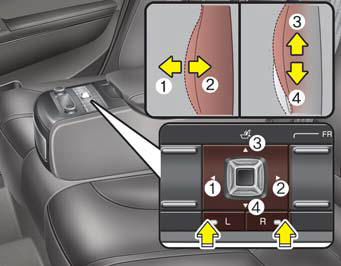
- For right side
:
Press the R switch.
The lumbar support can be adjusted by pushing the lumbar support lever.
Push the lever to left side (1) increase support or push the lever to the right side (2) to decrease support.
To move the support position up or down, push the lever upside (3) or down side (4).
- For left side
:
Press the L switch.
The lumbar support can be adjusted by pushing the lumbar support lever.
Push the lever to left side (1) increase support or push the lever to the right side (2) to decrease support.
To move the support position up or down, push the lever upside (3) or down side (4).
 Additional switches for adjusting the front passenger seat
The switch is located in the armrest of the rear seat.
To adjust the position of front passenger’s seat ;
Press the control switch forward (1) or rearward (2) to move the seat to the
desired p ...
 Rear switches operating limitation
You can activate or deactivate the rear seat control, rear audio control and
climate control by using the REAR LOCK button on the rear armrest or “System Settings”
in the AVN (Audio, Video, ...
See also:
Owner maintenance schedule
When you stop for fuel:
Check the engine oil level.
Check coolant level in coolant reservoir.
Check the windshield washer fluid level.
Look for low or under-inflated tires.
WARNING
Be ca ...
Immobilizer system
Your vehicle is equipped with an electronic engine immobilizer system to reduce
the risk of unauthorized vehicle use.
Whenever the ENGINE START/STOP button is changed to the ON position, the immobi ...
75,000 miles (120,000 km) or 60 months
Rotate tires
Inspect air cleaner filter
Inspect vacuum hose
Inspect air conditioning refrigerant
Inspect brake hoses and lines
Inspect drive shafts and boots
Inspect exhaust pipe and mu ...
Categories
