
 Kia K900: Interior overview
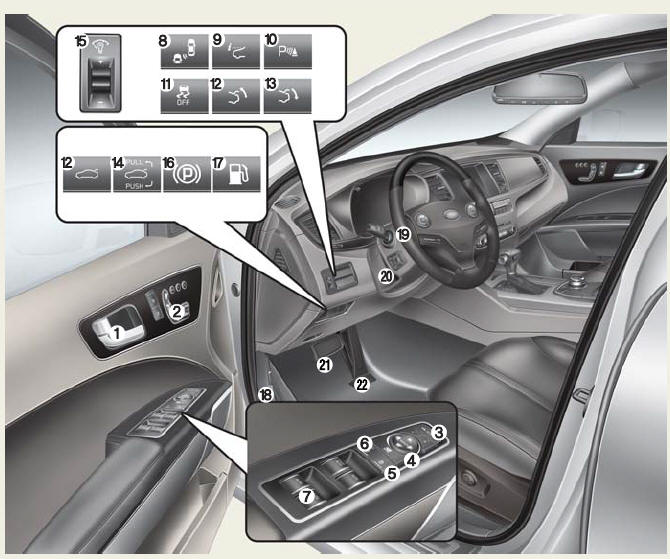
1. Inside door handle
2. Front power seat adjust switch
3. Outside rearview mirror folding
4. Outside rearview mirror control
5. Power window lock switch
6. Central door lock switch
7. Power window switch
8. BSD On/OFF button
9. HUD On/OFF button
10. Parking Assist button
11. ESC Off button
12. Trunk lid open button
13. Trunk lid close button
14. Trunk lid open / close button
15. Instrument panel illumination control lever
16. Electric parking brake switch
17. Fuel filler lid open switch
18. Hood release lever
19. Steering wheel
20. Tilt and telescopic steering control lever
21. Brake pedal
22. Accelerator pedal
 Exterior overview
Front view
1. Hood
2. Head lamp
3. Fog lamp
4. Tire and wheel
5. Outside rearview mirror
6. Panoramic Sunroof
7. Front windshield wiper blades
8. Windows
Rear view
9. Door
10. Fuel fill ...
 Instrument panel overview
1. Instrument cluster
2. Horn
3. Driver's front air bag
4. Engine start/stop button
5. Audio / Video / Navigation
6. Climate control system
7. Clock
8. Hazard warning flasher
9. Passe ...
See also:
Center console storage
To open the center console storage, pull up the lever. ...
Interior light
CAUTION
Do not use the interior lights for extended periods when the engine is not
running. It may cause battery discharge.
WARNING
Do not use the interior lights when driving in the dark. Accide ...
Check spark plugs and ignition system
Inspect your spark plugs as described in section 7 and replace them if necessary.
Also check all ignition wiring and components to be sure they are not cracked, worn
or damaged in any way. ...
Categories
