
 Kia K900: Bluetooth® Wireless Technology hands-free
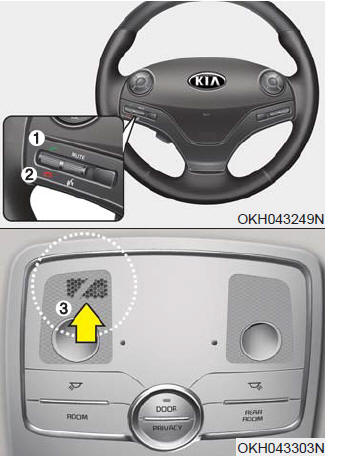
You can use the phone wirelessly by using the Bluetooth® Wireless Technology.
1. Call / Answer lever
2. Call end lever
3. Microphone
Detailed information for the Bluetooth® Wireless Technology hands-free is described in the manual supplied separately.
The Bluetooth® word mark and logos are registered trademarks owned by Bluetooth SIG, Inc. and any use of such marks by Kia is under license.
Other trademarks and trade names are those of their respective owners. A compatible Bluetooth® enabled cell phone is required to use Bluetooth® Wireless Technology.
 Driver Information System (DIS)
Detailed information for the DIS system is described in a separately supplied
manual. ...
 Antenna
When the radio power switch is turned on while the Engine Start/Stop Button is
in either the “ON” or “ACC” position, your car will receive both AM and FM broadcast
signals through the an ...
See also:
Adjusting outside rearview mirror
Adjusting the rearview mirrors:
Press either the L (driver’s side) or R (passenger’s side) button (1) to select
the rearview mirror you would like to adjust.
Use the mirror adjustment contro ...
Power outlet
The power outlets provide power for mobile telephones or other devices designed
to operate with the vehicle's electrical systems. These devices should draw less
than 10 amps while the engine ...
Rear camera display
The Rear-Camera Display is not a substitute for proper and safe backing- up procedures.
The Rear-Camera Display may not display every object behind the vehicle. Always
drive safely and use cauti ...
Categories
