
 Kia K900: Climate information screen selection
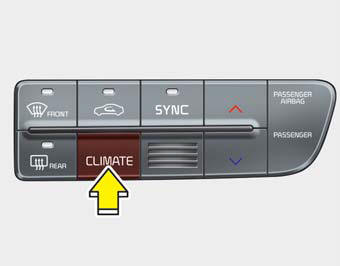
Press the climate information screen selection button to display climate information on the screen.
 OFF mode
Press the front OFF button to turn off the air climate control system. However,
you can still operate the mode and air intake buttons as long as the Engine
Start/Stop Button is in the ON po ...
 Rear control lock
You can activate or deactivate the rear seat control, rear audio control and
climate control by using the REAR LOCK button on the rear armrest or “System Settings”
in the AVN (Audio, Video, ...
See also:
To keep locks from freezing
To keep the locks from freezing, squirt an approved de-icer fluid or glycerine
into the key opening. If a lock is covered with ice, squirt it with an approved
de-icing fluid to remove the ice. If ...
Pursuant to Code of Federal Regulations, Title 47, Part 15 ("FCC Rules")
Operation is subject to the following two conditions:
1.This device may not cause harmful interference, and
2.This device must accept any interference received, including interference that
may cau ...
Vehicle recognition
Some vehicles ahead in your lane cannot be recognized by the sensor as follows:
- Narrow vehicles such as motorcycles or bicycles
- Vehicles offset to one side
- Slow-moving vehicles or suddendec ...
Categories
