
 Kia K900: Automatic heating and air conditioning
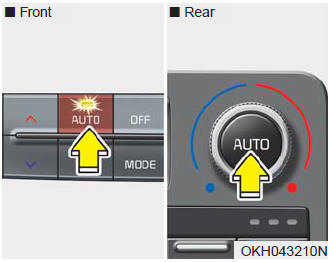
1.Press the AUTO button.
The modes, fan speeds, air intake and air-conditioning will be controlled automatically according to the temperature setting.
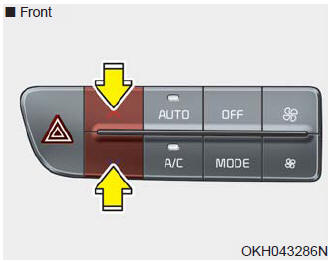
2.Press the TEMP button to set the desired temperature.
✽ NOTICE
- To turn the automatic operation off, select any of the following buttons: Mode selection button Air conditioning button Front windshield defroster button Air intake control button Fan speed control button The selected function will be controlled manually while other functions operate automatically.
- For your convenience and to improve the effectiveness of the climate control, use the AUTO button and set the temperature to 73°F (23°C).
✽ NOTICE
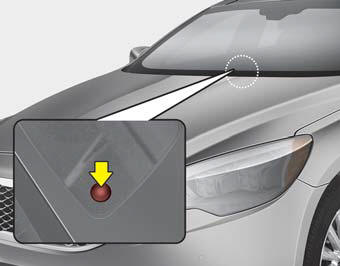
Never place anything over the sensor located on the instrument panel to ensure better control of the heating and cooling system.
 Automatic climate control system
1. Driver’s temperature control button
2. AUTO (automatic control) button
3. OFF button
4. Fan speed control button
5. Air conditioning button
6. Mode selection button
7. Front windshield ...
 Manual heating and air conditioning
The heating and cooling system can be controlled manually by pushing buttons
other than the AUTO button.
In this case, the system works sequentially according to the order of buttons
selected. Wh ...
See also:
Antenna
When the radio power switch is turned on while the Engine Start/Stop Button is
in either the “ON” or “ACC” position, your car will receive both AM and FM broadcast
signals through the an ...
Vehicle identification number
The vehicle identification number (VIN) is the number used in registering your
car and in all legal matters pertaining to its ownership, etc.
The number is punched on the floor under the front pa ...
To increase cruise control set speed
Follow either of these procedures:
Move the lever up (to RES+), and hold it. Your vehicle set speed will increase
by 5 mph (10 km/h). Release the lever at the speed you want.
Move the lever ...
Categories
