
 Kia K900: Interior overview
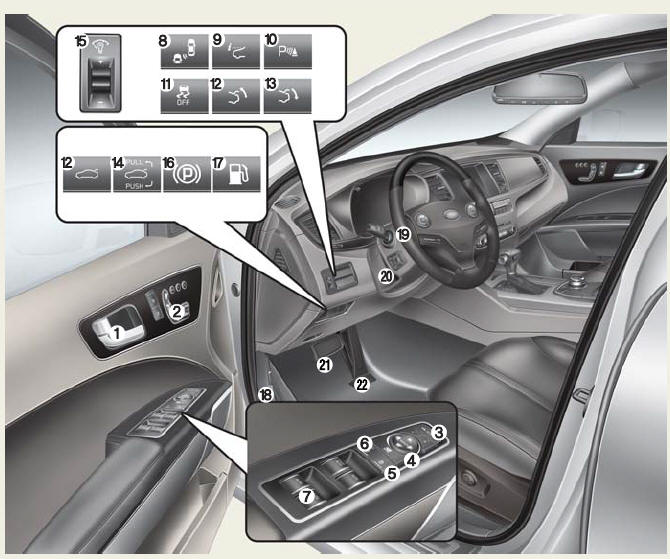
1. Inside door handle
2. Front power seat adjust switch
3. Outside rearview mirror folding
4. Outside rearview mirror control
5. Power window lock switch
6. Central door lock switch
7. Power window switch
8. BSD On/OFF button
9. HUD On/OFF button
10. Parking Assist button
11. ESC Off button
12. Trunk lid open button
13. Trunk lid close button
14. Trunk lid open / close button
15. Instrument panel illumination control lever
16. Electric parking brake switch
17. Fuel filler lid open switch
18. Hood release lever
19. Steering wheel
20. Tilt and telescopic steering control lever
21. Brake pedal
22. Accelerator pedal
 Exterior overview
Front view
1. Hood
2. Head lamp
3. Fog lamp
4. Tire and wheel
5. Outside rearview mirror
6. Panoramic Sunroof
7. Front windshield wiper blades
8. Windows
Rear view
9. Door
10. Fuel fill ...
 Instrument panel overview
1. Instrument cluster
2. Horn
3. Driver's front air bag
4. Engine start/stop button
5. Audio / Video / Navigation
6. Climate control system
7. Clock
8. Hazard warning flasher
9. Passe ...
See also:
System operation
Ventilation
1.Set the mode to the position.
2.Set the air intake control to the outside (fresh) air position.
3.Set the temperature control to the desired position.
4.Set the fan speed cont ...
Tachometer
The tachometer indicates the approximate number of engine revolutions per minute
(rpm).
Use the tachometer to select the correct shift points and to prevent lugging
and/or over-revving the engi ...
Changing tires
1.Park on a level surface and apply the parking brake firmly.
2.Shift the shift lever into P (Park).
3.Activate the hazard warning flasher.
4.Remove the wheel lug nut wrench, jack, jack handle, ...
Categories
