
 Kia K900: With the door lock button
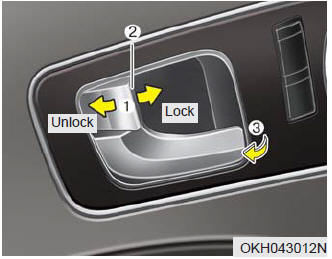
- To unlock a door, push the door lock button (1) to the “Unlock” position. The red mark (2) on the button will be visible.
- To lock a door, push the door lock button (1) to the “Lock” position. If the door is locked properly, the red mark (2) on the door lock button will not show.
- To open a door, pull the door handle (3) outward.
- If the inner door handle of the front door is pulled when the door lock button is in the lock position, the button will unlock and the door will open.
- Front doors cannot be locked if the smart key is in the vehicle and any front door is opened.
If a power door lock ever fails to function while you are in the vehicle, try one or more of the following techniques to exit:
- Operate the door unlock feature repeatedly (both electronic and manual) while simultaneously pulling on the door handle.
- Operate the other door locks and handles, front and rear.
- Lower a front window and use the key to unlock the door from outside.

 Rear door lock button
To lock a rear door, press the door lock button (1). The indicator on the
button will illuminate.
To unlock a rear door, press the door unlock button (2). The indicator on
the button will ...
See also:
If engine turns over normally but does not start
1.Check fuel level.
2.With the Engine Start/Stop Button in the OFF position, check all connectors
at ignition coils and spark plugs. Reconnect any that may be disconnected or loose.
3.If the engin ...
Fuel Gauge
This gauge indicates the approximate amount of fuel remaining in the fuel tank.
✽ NOTICE
The fuel tank capacity is given in chapter 8.
The fuel gauge is supplemented by a low fuel warn ...
Smooth cornering
Avoid braking or gear changing in corners, especially when roads are wet. Ideally,
corners should always be taken under gentle acceleration. If you follow these suggestions,
tire wear will be he ...
Categories
